
[Update] As of Q2 2026, Google has begun implementing these changes.
The ability to configure fetch email from other mail accounts using POP3 has been removed for new email accounts.
Existing POP3 email accounts setup in Gmail will continue to function until at least January 2027 according to Google’s implementation timeline.
To see the latest updates regarding these changes, refer to Google’s article: Learn about upcoming changes to Gmailify & POP in Gmail
What’s Changing
Google is disabling the ability to fetch email from external(non-Gmail) accounts using POP3 Fetch.
This change was forced by Google and affects all hosting providers equally, not just GreenGeeks.
On approximately September 30th 2025, Google sent out an announcement email to impacted users who are using the POP3 Fetch function.
Google Announcement – Learn about upcoming changes POP in Gmail
What’s POP3 Fetch
Gmail’s POP3 Fetch feature previously allowed Gmail to log in to an external mailbox(like a GreenGeeks hosted email) and periodically pull new messages into the @gmail.com account using POP3.
This was previously the recommended solution for combining email from multiple accounts into a single @gmail.com account.
What This Means
If you were using Gmail’s “Check mail from other accounts (POP3)” feature to retrieve mail from your GreenGeeks hosting email account, it will no longer work and must be replaced with an alternative method.
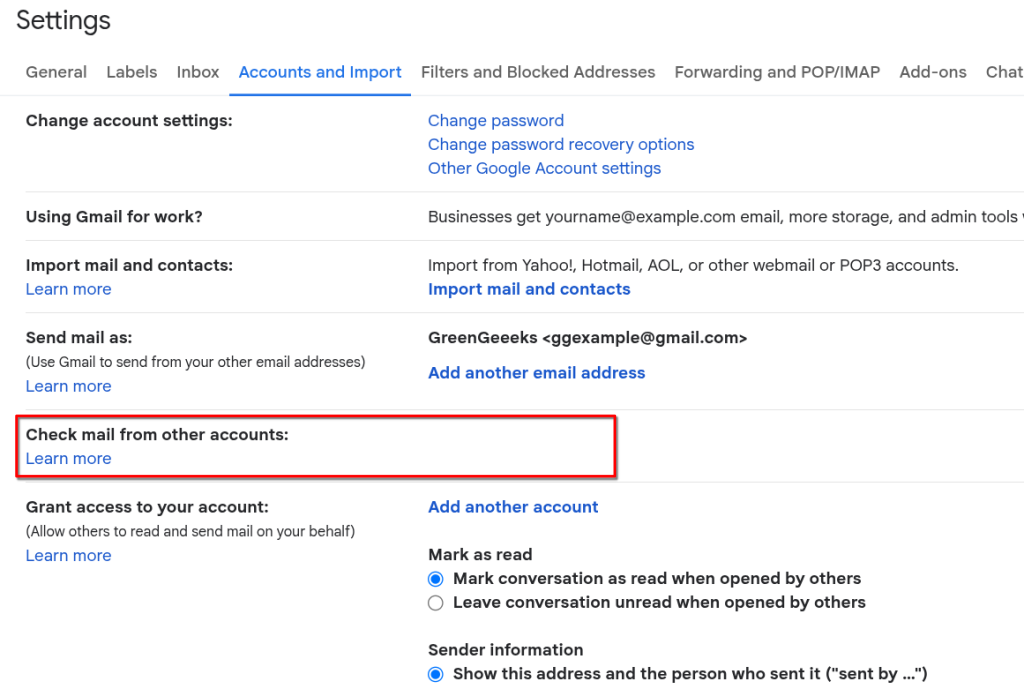
Gmail’s Android & iOS apps are not impacted by this change; email accounts on Gmail Android or iOS apps will continue to function as normal, as they do not depend on the Gmail server to fetch messages from GreenGeeks.
Recommended Alternatives
Email Forwarding (Recommended)
Email forwarders deliver messages immediately to Gmail as mail arrives.
- Email is received at [email protected]
- Our server forwards it directly to [email protected]
- Fully supported by Gmail
- Requires proper SPF/DKIM/DMARC configuration on the forwarder domain.
This is the simplest replacement for POP3 fetching.
Imapsync (Advanced)
Imapsync is a 3rd-party tool that can be used to migrate or periodically sync mail between two mail accounts via cronjob.
As Imapsync does not depend on the Gmail POP3 Fetch function, it will continue to function after January 2026.
Imapsync is the better option for users who need to:
- Import existing mailbox history.
- Preserve folders or read/unread status.
- Avoid the chance of messages being bounced as SPAM by Gmail during forwarding.
For more information about imapsync, refer to the Imapsync website.
What We Recommend
For most customers, we recommend:
- Using an email forwarder, or
- Setup the account directly in your local Email Client, i.e., Outlook, or Gmail for Android/iOS.
Do I Need to Take Action?
- You used Gmail POP3 fetching from GreenGeeks > Yes
- You already use a forwarder to @gmail.com > No
- You setup the Email Account in Gmail’s Android or iOS App > No
- Not sure > Contact GreenGeeks Support
If you have questions about this change, or need help setting up an email forwarder, please contact GreenGeeks Support for further assistance.