
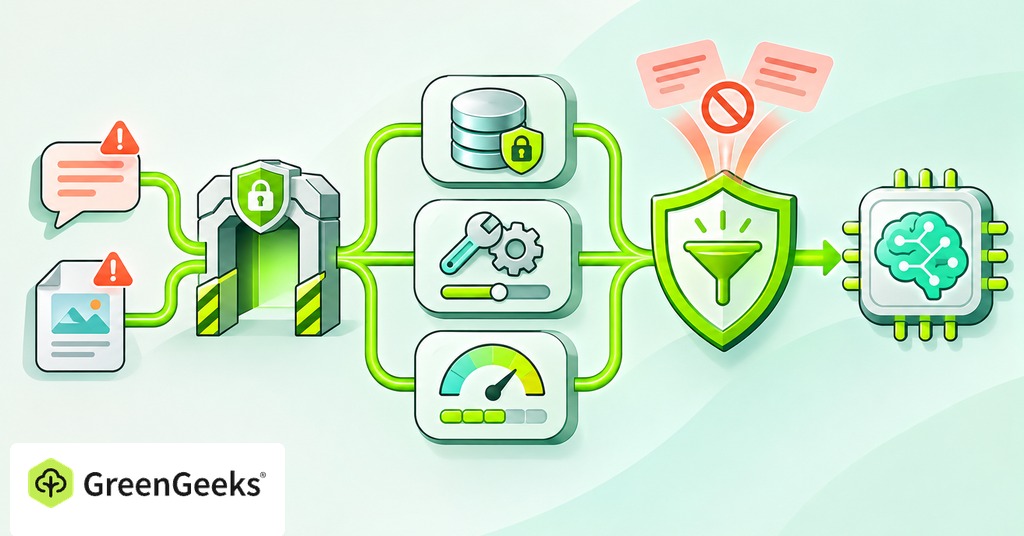
An AI feature needs more checks when a visitor’s text can lead it to read private records or call a paid service. The words in the form can influence what the model asks your application to do next.
Your code has to decide if each request is allowed. Instructions telling the model to behave carefully lower the risk, though a crafted message can talk it out of them.
What changes when user input reaches AI?
A language model can treat text as instructions even when you intended it to be material to read. An attacker may ask it to ignore its assigned task, reveal information, or use a tool in an unwanted way. This is prompt injection.

The attempt can arrive directly in a chat message. It can also arrive indirectly through a document, webpage, email, or other content the model reads on a user’s behalf. Checking the text typed into your form will not cover all those routes. A document your application retrieves can contain instructions from whoever controls its source, such as a request to send information elsewhere or call another tool. The model can encounter that instruction while doing the legitimate task.
The effect depends on the access you give the feature. A public-text summarizer has fewer possible actions than an assistant that can read customer records and change orders. Work out those permissions before choosing which safeguards to add.
Validate submissions before the model sees them
Keep the ordinary checks your application would need without AI. Confirm that the request has the expected fields, accepted formats, and permitted size. Enforce those checks on the server. Browser-side restrictions alone can be bypassed.
For uploads, allow only the file types the feature needs and limit their size. Check the file’s contents as well as its extension, since a visitor can rename any upload to look like an accepted type. If the file cannot be read, handle that error without showing internal details or passing on a partial, confusing result.
Limit the amount of text passed onward, including anything extracted from files. A small compressed upload can expand to many times its size once extracted, so a limit on the original request won’t cover it.
Keep application instructions separate from user content in the model request. Mark documents as material to analyze and tell the model which task to perform. Filters can catch known attack patterns, and labeling outside content can limit its influence on the model. A rule that blocks the phrase “ignore previous instructions” will miss an attack written in other words. Expect some malicious text to reach the model, and design the permission checks for that case.
Keep private data and API keys out of reach
Check who the user is before you fetch private data. Then check which records that account is allowed to read. Make that decision before putting the material in the model’s context. For an order assistant, look up permitted purchases through the authenticated account. Typing a different account number into the prompt should never open another customer’s records. A model instruction saying “only show this user’s orders” does not enforce the database rule.
Apply the same check to document search. Retrieval should only return material the user can read. Passing every company’s documents to the model and asking it to keep them separate puts protected information in the wrong place before an answer is written.
Send only the information required for the task. Keep API keys in restricted server-side storage, outside browser code, prompts, and responses. Assume that text included in a system prompt could be disclosed.
Check the AI service’s current settings for handling and saving data too. Know where the data you send ends up and who can read stored requests. Avoid collecting sensitive information the feature does not need.
Give the model only the tools it needs
Treat a tool request from the model as a proposal your code must check. The application should recognize the allowed function, check the values it passes, and confirm the user’s permission before running it.
Read-only access
A feature that answers product questions has no use for a delete tool. Give it a search function that can only read the catalog.
Scope that function to the permitted data. Where possible, use a separate service identity with only the required access. A read-only task should not borrow an administrator’s credentials because they are convenient.
Also restrict what external destinations the feature can contact. An injected instruction should not be able to send retrieved information to an arbitrary URL.
Changes to records
For a feature that edits data, check that the current user may make that change to the record. Verify the permitted operation even if the model supplied a plausible explanation for it.
Require a person to review high-impact changes before they run. Show the actual proposed action, such as the recipient, amount, or record being changed. Broad approval at the start of a conversation may not cover what the model proposes several steps later.
Keep a record of the approved action and what happened. If malicious content redirects the model, the application check blocks the unauthorized operation.
Output from the model
The model’s response is another input your application has to handle. Treat it as untrusted when you display it or pass it to a database, command runner, or other service.
A normal answer can be displayed as plain text. If you render Markdown or HTML, restrict the supported features and sanitize the result for that use. Do not allow generated text to become unrestricted browser code.
Use prepared database queries with validated values. Do not execute a generated SQL statement simply because it came back from your own model call. The visitor’s input may have influenced it. Avoid giving the model a general command runner when a small, defined function can do the job. A tool that takes a validated product identifier can do one lookup. Give the model a shell, and it gets every permission the server account has.
Structured output can make validation easier because the application knows which fields and value types to expect. It still needs to check what those values mean and if the user is allowed to make the requested change. Valid JSON can describe an action the user has no right to take.
Request and spending limits
A public AI feature can generate charges for model requests even when it never exposes private information. Long submissions, repeated requests, and chains of tool calls can all increase the bill.
Set limits at several points.
- Limit the input and the model’s output length.
- Limit requests and usage per account over a defined period.
- Cap the number of tool calls and steps that follow them.
- Set timeouts and limits on simultaneous jobs.
- Stop new work when an enforced usage allowance is exhausted.
A billing alert sends a notice when spending passes a threshold. On Google Cloud, an alerts-only budget doesn’t cap usage on its own, so requests keep running after the alert fires. If you need a firm limit, confirm which service enforces it and what happens when it is reached.
Track failures and retries too. A failed response may already have consumed resources. An automatic retry loop needs a maximum attempt count so one difficult request cannot run indefinitely.
Decide what visitors see when the feature is busy or unavailable. A short notice and another way to reach you can keep the rest of the website useful while the AI feature pauses.
Test the feature as an untrusted user
Create test accounts with different access rights, and fill them with harmless sample records. Try to get another account’s data. Put unwanted instructions in a test document and in the chat field.
Request a tool the feature should not have, then try to make an allowed one perform an unauthorized operation. Check the application logs and the resulting records. The test passes when the logs show the protected action never ran, whatever the model said in the chat.
Test oversized submissions, invalid files, repeated requests, and stopped jobs. Confirm that a timeout does not leave an uncontrolled task running elsewhere. Make sure markup from the model cannot run unwanted code in the browser.
Keep logs of request identifiers, access decisions, tool actions, errors, and usage. Avoid saving raw private documents, credentials, or complete conversations unless you need them and have an appropriate retention plan. Restrict access to the logs themselves.
Repeat the tests that apply when you change the model, prompt, retrieval system, or tools. A feature with new permissions needs another review even if the public form looks the same.
What your hosting provider can handle
Depending on the plan, a host manages the server along with its SSL certificates and network firewall. Your application must enforce document permissions, validate tool requests, protect secrets, and limit AI usage. Confirm that the plan can run the language and background work your feature needs. GreenGeeks supports Node.js applications on its Pro and Premium plans, and its VPS hosting adds root access for installing the software a feature depends on. Ask any host which infrastructure protections it provides, and give your developer ownership of the checks inside the application.
