
Search Engine Optimization (SEO) is one of the most important aspects of any successful website. While there are many ways to improve SEO, one of the most common practices is to utilize a keyword research tool.
These tools provide detailed information on a keyword. You can see how much traffic it gets, the competition level, the expected value of that keyword, and other information. This can help you pick more valuable keywords to rank higher with.
While there are many plugins to choose from, the Keyword Research Tool plugin for WordPress is a great choice. Today, I will demonstrate how it works.
What is Keyword Research?
Keyword research is a process that SEO specialists use to find relevant search terms when building and writing content. The idea is to find the best keyword for the product, topic, or article at hand.
They then take the best keywords they find and apply them to the content that is being produced. The idea is to use them in a way that makes the content most relevant for search engines.
There are two main types of keywords: Short-Tail Keywords and Long-Tail Keywords.
Short-Tail Keywords: These types of keywords are the most commonly searched words and have a lower conversion rate because they are too generalized. A good example of a short-tail keyword is “movie theaters.”
Long-Tail Keywords: These types of keywords have a much higher conversion rate because they are more specific to a user’s search. They have less web traffic associated with them, but the conversion rate is what website owners really want. These are more detailed and are usually longer in word count. A good example of a long-tail keyword is “movie theaters Los Angeles.”
There are a lot of different keyword research tools available out there today. Let’s take a look at the plugin we are going to use for keyword suggestions in WordPress and see what it has to offer.
How to Set Up Keyword Research Tool
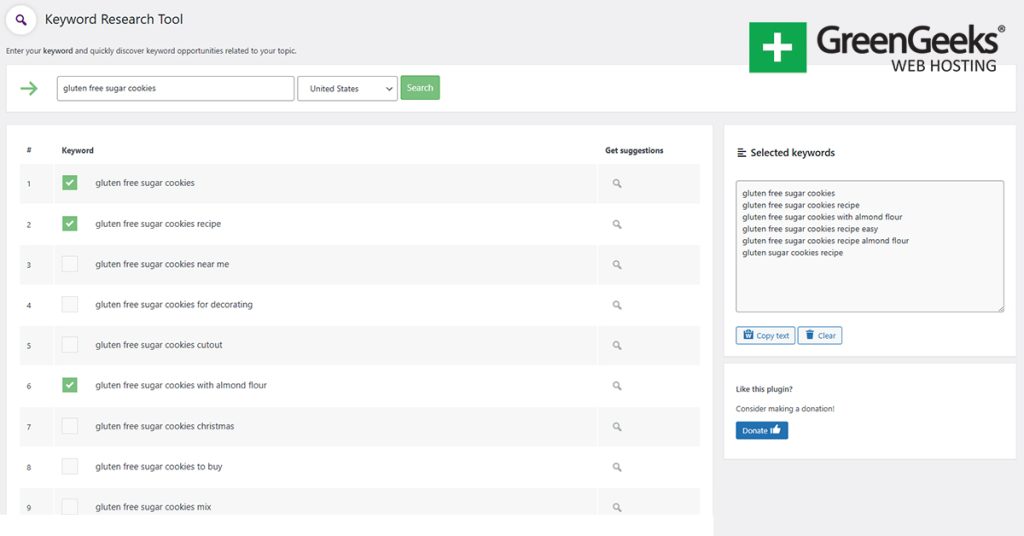
The Keyword Research Tool is a plugin that gives you the ability to search for long-tail keyword suggestions right from the dashboard of your WordPress website. The tool gives writers and content creators the chance to improve the overall visibility and search results.
You simply enter the focus keyword you are trying to rank for in something like Google. The keyword research tool takes the focus keyword that you put in and generates a list of related keyword opportunities for you to select and implement.
The plugin is straightforward to use. All you do is enter your focus word, and the tool generates a list of suggested keywords. You simply select from the list of keywords generated and use them to create amazing content.
All in all, the plugin makes it easy to search for long-tail keywords right from the comfort of the WordPress admin dashboard.
Let’s get the Keyword Research Tool installed and set up so that you can start creating great content.
Step 1: Install and Activate the Plugin
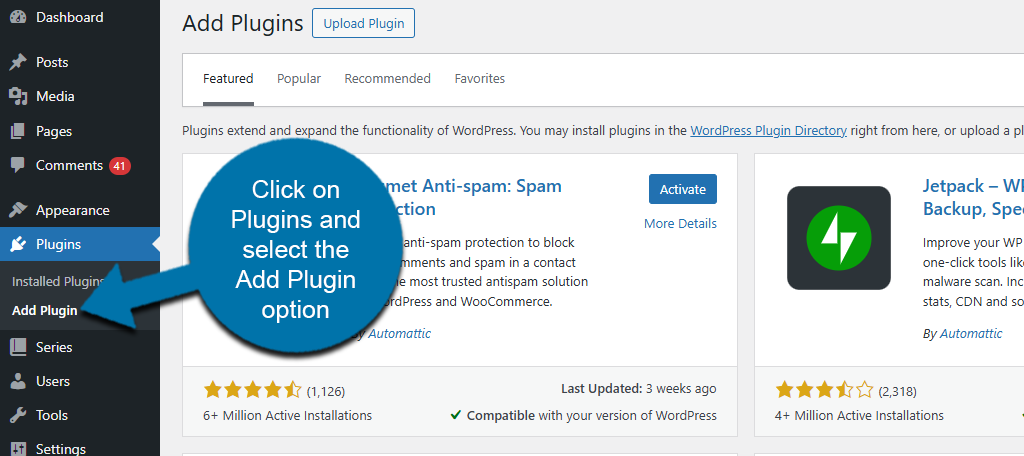
Let’s start by clicking on Plugins and selecting the Add Plugin option on the left-hand admin panel.
Search for Keyword Research Tool in the available search box. This will pull up additional plugins that you may find helpful.
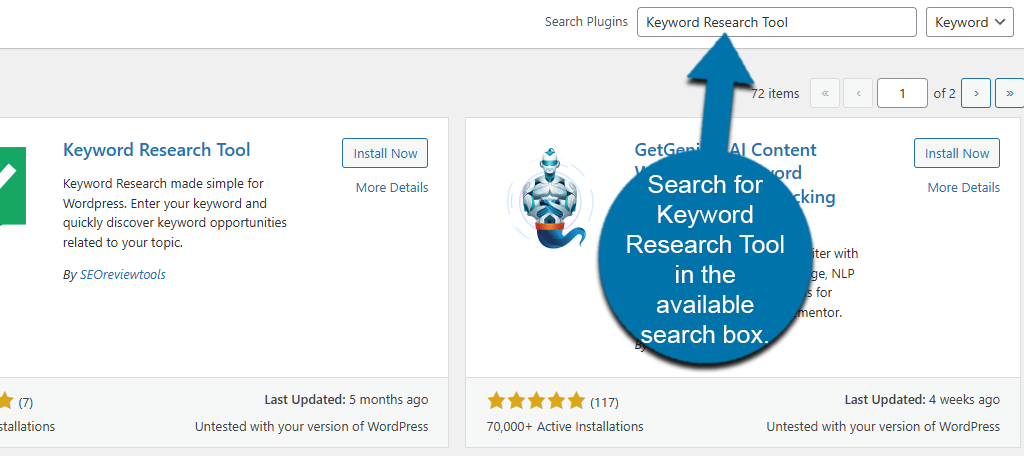
Find the Keyword Research Tool plugin, click the “Install Now” button, then activate it.

Step 2: Research Keywords
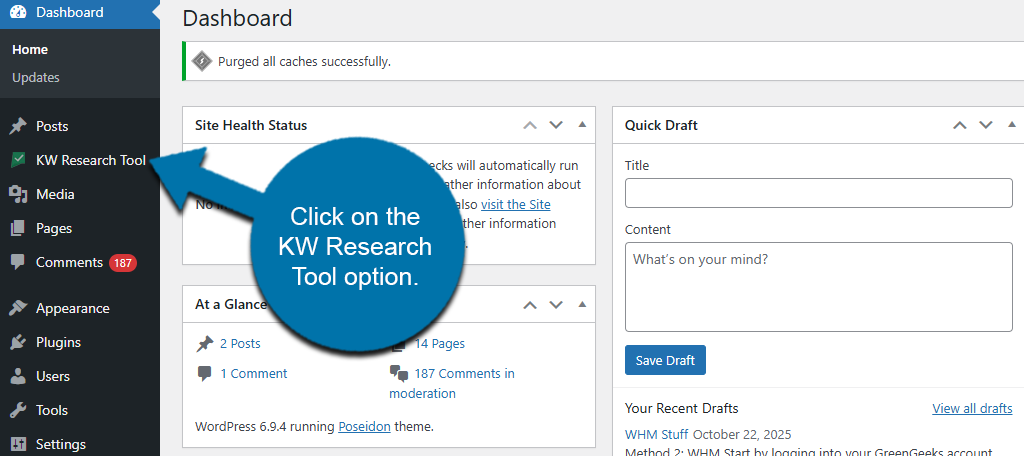
On the left-hand admin panel, click on the KW Research Tool option.
This will bring you to the main search page of the plugin. Simply enter the keyword you are interested in researching in the available search box, select the country, and click on the “Search” button.

The Keyword Research Tool will now begin searching. After a few moments, the plugin will display a list of keywords. The number depends on the keyword you entered. Click the box next to the words and phrases to select them.

Once you have selected all of the keywords you’d like to use, they will appear in the box on the right side. Click on the “Copy Text” button under it.
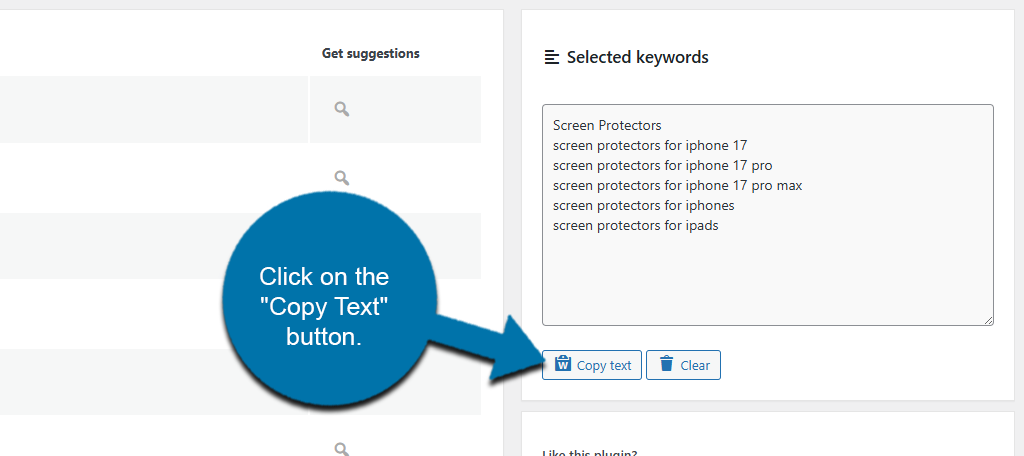
All that’s left is to copy them into the text editor of your choice. This could be within the Gutenberg editor itself, or if you prefer writing in a Word document, paste them there. The idea is to have the list in front of you so you can incorporate it into what you are writing.
You could also place them directly into your WordPress post at the bottom as a reminder that you want to implement those words while writing. Then, just delete that block of words once you’re done writing the post.
And with that, you now know how to use the Keyword Research Tool for WordPress.
Other Keyword Research Plugins to Try
The Keyword Research Tool is a simple but effective plugin. That said, there are many other plugins you can use in WordPress. Here are some other suggestions to consider using.
Yoast SEO

Yoast SEO is an all-in-one SEO tool for WordPress. It handles every aspect of SEO management with you. Naturally, it also has a keyword research function. This is through integration with SEMrush.
As you write your content, you can ask for keyword recommendations directly in the Gutenberg editor. It will generate keywords that may be beneficial to your content. It also has functionality to track keyword usage.
While it is not an exact science, Yoast will tell you if you have used the keyword enough throughout your content. It will also remind you to use it in your headers, image alt-text, and description.
Keyword research is only one part of Yoast SEO. It also has a ton of other features. Some of these include XML sitemap generation, breadcrumb controls, redirection management, and much more.
Due to the quality of the plugin and the number of features it offers, Yoast SEO is trusted by over 10 million users worldwide. Be sure to give this a try today.
FAQs
Yes, the Keyword Research tool plugin is free to use. There are no limitations on the number of keywords you can generate, so use the plugin as much as you want.
Every time you create new content. Improving your website’s SEO is one of the most important aspects of any site. Keyword research helps improve SEO, so it should be used every time you create new content.
Absolutely! Feel free to use as many as you want. Many tools offer more information that can prove useful, but keep in mind that installing multiple plugins may slow down your WordPress site.
You should use both. Short-tail keywords are more generalized, while long-tail keywords are more specific. There are advantages to both; thus, using both is recommended.
It really depends on the subject matter and the length of what you are writing. The goal is to naturally use the keyword in what you are writing so it seamlessly blends in. The longer it is, the more keywords it should include.
Yes. This is a good way to see what is working and what isn’t. You can choose to rank for the same keyword if you can do it better, or rank for something else to avoid directly competing.
Questions remain the most searched term by users. If you are trying to answer a question, be sure to include the question in what you are writing to help users locate your content in search results.
Start Researching Keywords Today
Keyword research is one of the most important aspects of improving SEO for your website. It can provide valuable insight into what users search for and how you can write your content to attract those users.
While the Keyword Research Tool is a simple tool, other keyword tools are more robust and provide additional details to help you make better decisions. Be sure to explore other options to get the best results.
Has researching keywords improved your rankings on Google? What keyword research tool do you use?