Cheap unlimited web hosting is a real product that promises unmetered disk space and bandwidth, nothing more. Storage and transfer do go unmetered on these plans. The limits that bind an account are file counts and CPU seconds, both written into a fair-use policy most buyers never open. Shared plans cap the file count somewhere between 100,000 and 600,000. A small site can run for years without reaching either limit. A busy one can be cut off with 50 GB of free disk space showing in its control panel.
What “Unlimited” Means in the Terms of Service

GreenGeeks writes the unmetered promise into plans marked unlimited and then, in the same section, requires every account to use those resources for the normal operation of a personal or small business website. An account used to archive files can have those files removed. The host will try to warn the owner first without promising to.
Every major host has a version of this clause. The unmetered promise holds. The policy behind it is the part that hosts enforce in practice. Bluehost’s version names processor time and memory explicitly, while other hosts leave the trigger undefined.

The Case Against Unlimited Hosting

On WebHostingTalk, where hosting professionals argue among themselves, the consensus phrasing is blunt. Unlimited with limits is a lie, they say. Their point is that redefining a word inside a terms document does not change what buyers thought they were purchasing when they read the homepage.
Complaints from suspended accounts are more serious than the argument about the word. A suspension for high server load can arrive on an unlimited plan without any abuse behind it. Once a busy site begins to consume real processor time, it becomes a problem for the host that sold it the plan.
A WordPress developer takes the same support call several times a year. With 50 GB of disk space free, a 200 KB image upload fails with a vague server error. Posts stop saving, and the contact form stops submitting. The first time it happened to him, he spent 45 minutes ruling out database corruption and plugin conflicts before a support ticket revealed the account was at 98% of its file-count capacity, which had nothing to do with disk usage.
SiteGround enforces its CPU limits in stages that push the account toward a larger plan. A warning email with steps to fix the issue arrives first. After two notices without a fix, the site locks until the next billing cycle, or until the account pays for a bigger plan. A CPU warning can reach an account running 16 ordinary WordPress plugins on modest traffic, because a single bot generating more than 300,000 hits in under 48 hours will spend the allowance with no human visitor involved.
Where the Case Overreaches

A 1,200 GB server sold honestly at 20 GB per $10 account brings in $600 a month. The forums skip that arithmetic. Without overselling, cheap shared hosting cannot exist at any price a hobbyist would pay. The $600 barely covers the hardware and power, let alone rack space and support staff. Charging enough to cover costs without overselling works out to $30 or $40 per account per month.
A fresh WordPress installation consumes somewhere between 1,700 and 4,000 inodes once themes and plugins are counted. The average website is under 1 GB with modest traffic. Against published file caps of 100,000 to 600,000, a normal small site uses a few percent of its allowance, which is why the cap almost never binds. Overselling works because that distribution holds across nearly every account on a shared server.
Overselling and overloading are different practices that the marketing debate usually treats as one. Overselling means selling capacity that is allocated but unused, and it does little harm when the host plans capacity and adds hardware on a regular schedule. Overloading, cramming hundreds of sites onto a server until load times and uptime degrade, is the practice that does the damage.
Disclosure is the part of the criticism that holds. Some hosts publish their real limits. The hosts that keep them vague are where the abuse happens. Where a policy says only normal use, enforcement is at the host’s discretion, and discretion is what produced the suspensions described above.
The Limits That Bind a Shared Plan
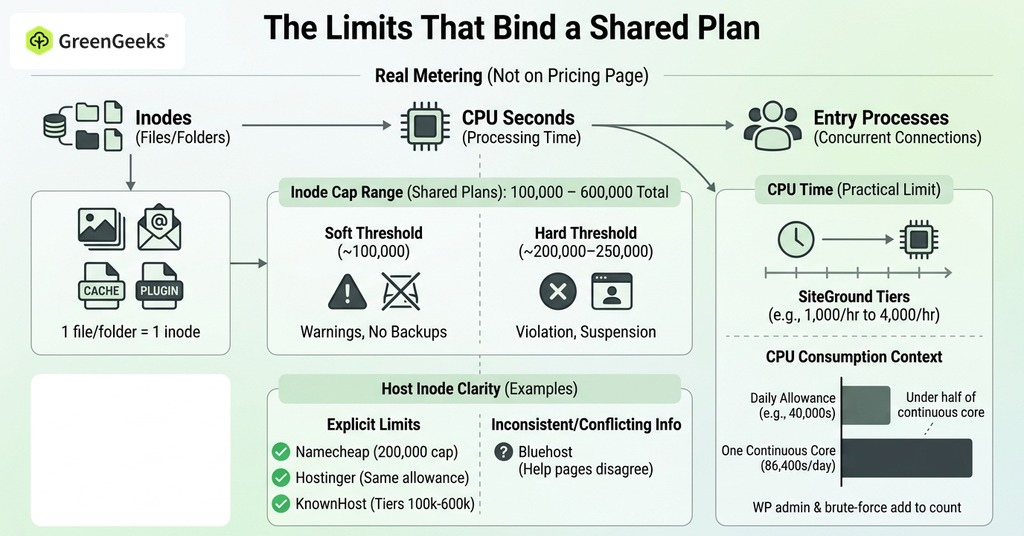
Inodes and CPU seconds do the real metering on a shared plan, with entry processes close behind, though the pricing page lists none of the three.
Inode Limits
A single file or a single folder counts as one inode. Every image and every email counts once, and so does each cache file and plugin file. Most shared plans cap the total between 100,000 and 600,000. A soft threshold near 100,000 stops backups from including the account and brings warnings. A hard threshold around 200,000 to 250,000 puts the account in violation of the terms and opens it to suspension.
Namecheap caps shared accounts at 200,000. Hostinger provides the same allowance even on its smallest plan. KnownHost tiers its limit explicitly from 100,000 up to 600,000 and calls it a hard file-system limit. Those three at least tell an account holder what to plan against. Bluehost’s own help pages disagree with each other, one stating 200,000 per account and another describing 50,000 as the soft limit with 1,000,000 as the violation line, which leaves nothing to plan against at all. Any number you read is dated, since hosts revise these limits as their hardware changes.
CPU Seconds and Throttling
CPU time is the limit that ends unlimited plans in practice. SiteGround publishes its structure openly, and the entry plan gets 1,000 CPU seconds per hour and 300,000 per month, rising to 4,000 per hour and 800,000 per month on the top tier, with no account allowed more than 20% of CPU for longer than 10 seconds. Every WordPress admin page consumes multiple executions, and brute-force login attempts add to the count continuously. A daily allowance of 40,000 seconds is under half of what one CPU core running continuously would consume in a day, which is 86,400 seconds.
On servers running CloudLinux, the standard operating system for shared hosting, an account over its CPU allowance is slowed down for as long as the overuse continues rather than switched off. The site stays online and responds slowly until the load passes, which is a milder outcome than the word suspension suggests.
Entry Processes and the 508 Error
Entry processes are the least understood cap, meaning the number of PHP scripts or connections an account can run at the same instant. Base plans commonly allow 20.
A page that loads in a tenth of a second handles 10 visitors per second comfortably if they arrive in sequence, but 10 visitors in the same instant need 10 entry processes for that moment. When the cap is reached, visitors see a 508 Resource Limit Reached error. The count is per account rather than per site, so one busy site on a plan throws the error on all of them. Nothing has broken at that point, and the error clears as soon as the queue drains, usually within seconds.
What an Honest Unlimited Plan Looks Like

An unlimited plan is worth what the host is willing to publish about it. SiteGround prints CPU-seconds tables and KnownHost prints its tiered inode limits. Namecheap publishes per-tier allowances for CPU and memory alongside entry processes and I/O.
GreenGeeks is vaguer on file counts. The company does not publish per-plan inode limits or a MySQL connection limit, so its allowances are harder to read than a printed table. It does publish its enforcement rules. Accounts exceeding their computing resources are slowed automatically for as long as the overuse lasts, suspension is reserved for accounts disrupting others, and the stated resolution is a conversation about upgrading. Among the named prohibitions, the one that matters most to buyers is the ban on using the account as backup or archive storage, alongside narrower rules on cron frequency and mailbox size.
To check a host before buying, open its Terms of Service or Acceptable Use Policy and search it for inode and CPU, then for entry process and fair use. Numbers mean there is something real to evaluate. A document that offers only normal-use language leaves the host to set the limit at the moment the account crosses it.
When Unlimited Is Fine and When It Is Not

For a personal site, a blog, or a small business page, an unlimited shared plan from a host that publishes its limits is a reasonable purchase, because a few thousand files and a gigabyte of storage never approach any posted cap. The limits are reached in predictable places. Media archives stored on the server and backups kept in the hosting account are two of them, along with large WooCommerce catalogs and traffic spikes that keep dozens of simultaneous connections open. Recurring 508 errors and inode warnings that survive a cleanup are the clearest signals. Repeated CPU emails confirm them. A VPS removes those constraints because its resources are dedicated to one account.
Frequently Asked Questions

Is Unlimited Web Hosting Really Unlimited?
No. Every server runs on finite hardware, and unlimited means only that the host does not meter disk space or bandwidth up front. The real limits are written into the fair-use policy and enforced when usage exceeds what the host considers normal. Some hosts convert the vagueness into numbers, with Verpex capping multimedia files at 10 GB per account and mailboxes at 20 GB.
What Is an Inode Limit in Web Hosting?
An inode limit caps the total number of files and folders on an account, where every image and every email counts as one. Most shared plans cap inodes between 100,000 and 600,000, and reaching the cap blocks new files and incoming email even with disk space free.
What Happens If I Exceed My Hosting Inode Limit?
The consequences come in stages. Backups stop past a soft threshold around 100,000 files, uploads and email fail at the hard threshold, and accounts past roughly 200,000 to 250,000 files violate most hosts’ terms and can be suspended. iPage sends a notice listing the top inode-consuming directories so the owner can clean up before reaching the limit.
What Is the 508 Resource Limit Reached Error?
It is a server-level error returned when a shared account momentarily exceeds its CloudLinux allowance on CPU or concurrent processes. It clears once usage drops.
What Is an Entry Process Limit?
It caps how many PHP scripts an account can run simultaneously. Namecheap’s base plans allow 20 and its Business tier 40, and the count includes background AJAX hits, so a busy WordPress dashboard consumes processes even with few visitors on the site.
What Is Overselling in Web Hosting?
Overselling is selling more disk and CPU than a server physically contains, on the statistical fact that most websites stay small. It is what makes $3 to $10 monthly price points possible, and it becomes a problem only when hosts overload servers instead of managing capacity.
Can a Host Suspend My Account on an Unlimited Plan?
Yes, and it happens in practice. Every major host’s terms allow suspension for excessive resource use regardless of advertised unlimited storage. HostGator’s long-standing clause bars any account from using 25% or more of system resources for longer than 90 seconds.
What Is a Fair Use Policy in Hosting?
It is the clause that converts unlimited marketing into enforceable limits, defining normal website operation and naming the specific allowances the host will enforce.
Do Unlimited Hosting Plans Allow File Storage or Backups?
Unlimited plans do not allow it. Under terms that restrict usage to files belonging to the active website, using the account for backups or archives can end in content removal or termination.
When Should I Upgrade from Shared Hosting to a VPS?
Upgrade when you see recurring 508 errors or slowdowns during busy periods. Inode warnings that survive a cleanup are another signal, and repeated CPU-limit emails confirm them. Move before the server suffers. Resource warnings arrive before suspensions do. A site that ignores all three signals ends up suspended before it upgrades on the host’s schedule and at the host’s price.